Corporate Server Room Cooling Systems: Explore Precision Temperature Control
Corporate server rooms support essential business operations, from internal applications and databases to communication platforms and network infrastructure.
As servers process information, they generate heat that must be removed to maintain stable operating conditions. Corporate server room cooling systems provide controlled temperature management to protect equipment and support reliable performance.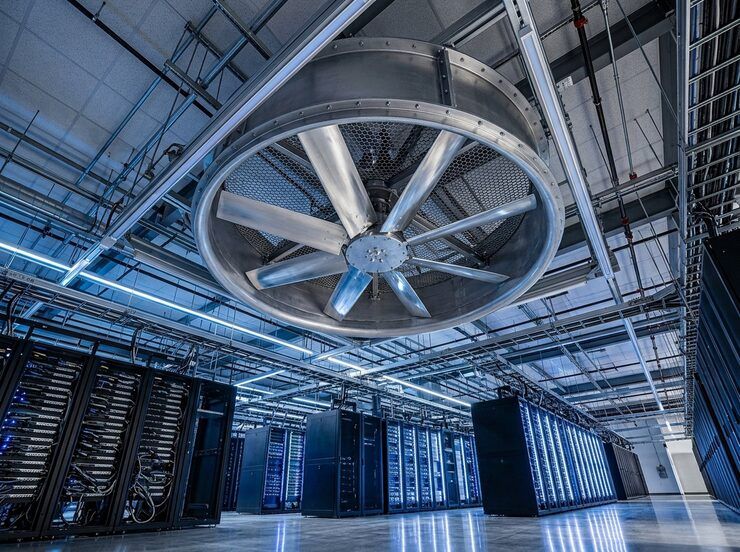
Unlike ordinary office air conditioning, server room cooling must account for concentrated heat loads, equipment placement, airflow patterns, and continuous operation. Even a relatively small room can contain substantial computing capacity, making careful thermal management necessary for businesses that depend on uninterrupted access to digital systems.
Understanding precision temperature control helps IT teams, facility managers, and infrastructure planners make informed decisions about cooling capacity, airflow design, environmental monitoring, and energy use. Each element contributes to a cooling strategy that matches the room's actual operational requirements.
Why Server Rooms Require Precision Cooling
Servers, storage arrays, switches, and networking equipment convert electrical energy into heat during operation. As equipment density increases, that heat can accumulate faster than conventional ventilation or standard comfort cooling can remove it.
Excessive temperatures can increase fan activity, trigger thermal throttling, shorten component life, or cause equipment to shut down for protection. Temperature fluctuations and poor airflow can also create localized hot spots, even when the room's average temperature appears acceptable.
Precision cooling focuses on the environmental conditions surrounding IT equipment rather than simply making a room comfortable for people. Systems are designed to manage heat loads, maintain appropriate humidity, distribute conditioned air, and respond to changing operating conditions.
The objective is not to make the room as cold as possible. It is to maintain a stable, equipment-appropriate environment while avoiding unnecessary energy consumption.
How Precision Temperature Control Works
Corporate server room cooling systems remove heat from equipment areas and transfer it elsewhere through a controlled refrigeration or heat-exchange process. Depending on the installation, the system may use direct-expansion cooling, chilled water, or another engineered arrangement.
Temperature sensors measure conditions at selected points, often near equipment air intakes and return-air locations. A controller uses these readings to adjust cooling output, fan speed, or other operating parameters.
This feedback process helps the system respond when server workloads change. For example, a sudden increase in computing activity can raise the heat generated by a rack. A properly configured cooling system detects the changing conditions and adjusts its operation to maintain the required environment.
Control accuracy depends on sensor placement, calibration, equipment configuration, and the relationship between airflow and heat generation. A single wall-mounted thermostat may not reveal a hot spot inside a densely populated rack.
Selecting the Right Cooling Configuration
The appropriate cooling arrangement depends on room size, equipment density, available utilities, operating schedules, and the consequences of cooling failure.
Smaller server rooms may use dedicated precision air-conditioning units that circulate conditioned air throughout the space. These systems can be suitable when equipment loads and room layouts allow effective air distribution.
Larger or more densely populated environments may require cooling designed around individual racks or rows. In-row systems position cooling equipment close to the heat source, while rear-door heat exchangers remove heat as warm air leaves server racks. These approaches can reduce the distance that heat must travel before removal.
Chilled-water systems use water supplied by a cooling plant to absorb heat through coils or heat exchangers. Direct-expansion systems instead use refrigerant to transfer heat. Each arrangement has different infrastructure, maintenance, control, and expansion requirements.
Cooling capacity should be determined through a heat-load assessment rather than room dimensions alone. IT power consumption, equipment density, lighting, people, external heat transfer, and other loads all influence the actual requirement.
Managing Airflow Around Server Racks
Temperature control depends on moving the right amount of air through the right locations. Even a cooling unit with sufficient capacity can perform poorly when conditioned air bypasses equipment or warm exhaust air returns to server intakes.
Many server environments use a hot-aisle and cold-aisle arrangement. The fronts of racks face one another across cold aisles, where conditioned air is supplied. The rear sides face hot aisles, where heated exhaust air is collected and removed.
This arrangement separates incoming cool air from outgoing warm air. Containment systems can strengthen the separation by enclosing either the hot aisle or the cold aisle, reducing unwanted mixing.
Cable openings, unused rack spaces, poorly positioned perforated floor tiles, and gaps around equipment can disrupt airflow. Blanking panels help prevent air from circulating through empty rack spaces instead of passing through installed equipment.
Regular airflow assessments are useful after racks are rearranged, new equipment is installed, or cooling capacity changes. Thermal mapping can identify areas that need better air distribution before temperatures become operational problems.
Temperature, Humidity, and Environmental Monitoring
Stable server room conditions involve more than a single temperature reading. Humidity, condensation risk, dust, and changes in airflow can also affect IT equipment.
Temperature targets should follow equipment manufacturers' specifications and applicable data-center guidance. ASHRAE's thermal guidelines are widely used as a reference for understanding recommended and allowable environmental conditions for IT equipment. The appropriate operating range depends on the equipment class and the specific environment.
Humidity management is equally important. Excessively high humidity can contribute to condensation under certain conditions, while very low humidity can increase electrostatic discharge risks. Monitoring relative humidity alongside temperature helps facilities teams understand the overall environment.
Modern monitoring systems may collect readings from multiple rack inlets, cooling units, and room locations. Alerts can notify operators when conditions approach defined thresholds, while historical data helps reveal recurring hot spots or gradual performance changes.
Sensor placement matters. Measurements taken only near the cooling unit may not reflect conditions at the top of a heavily loaded rack or inside a poorly ventilated cabinet.
Energy Efficiency Without Compromising Reliability
Cooling can represent a significant portion of the electricity used by an IT facility. Improving efficiency requires matching cooling output to actual heat generation rather than running equipment continuously at unnecessary capacity.
Variable-speed fans and compressors can adjust output according to demand. Efficient airflow design also reduces the energy required to move air and helps conditioned air reach the equipment that needs it.
Where outdoor conditions and system design permit, economizers can reduce reliance on mechanical refrigeration by using suitable outdoor air or favorable external cooling conditions. The availability and effectiveness of these approaches depend on climate, air quality, humidity, and the cooling architecture.
The Power Usage Effectiveness metric, commonly called PUE, compares total facility energy consumption with the energy consumed by IT equipment. It can help organizations understand overall infrastructure overhead, although it does not independently measure cooling effectiveness or equipment reliability.
Efficiency improvements should always be evaluated alongside environmental stability. Raising temperature settings, reducing airflow, or switching off equipment without adequate analysis can create hot spots or reduce the system's ability to respond to sudden load increases.
Reliability, Redundancy, and Preventive Maintenance
A server room cooling system must be designed around the consequences of failure. If a cooling unit stops operating, temperatures can rise quickly in a densely populated space, depending on the equipment load and room characteristics.
Redundancy provides an additional layer of protection. Depending on the required availability, installations may use backup cooling units, independent power supplies, redundant pumps, or alternative heat-rejection arrangements.
The N+1 configuration is a common redundancy concept. It provides one additional unit beyond the number needed to handle the design load. However, the extra unit only improves resilience when controls, electrical supply, airflow paths, and supporting infrastructure can accommodate a failure.
Preventive maintenance supports reliable operation. Typical tasks include cleaning filters and coils, checking condensate drainage, inspecting refrigerant or chilled-water components, testing alarms, verifying sensor accuracy, and reviewing controller performance.
Maintenance schedules should reflect manufacturer requirements, operating conditions, and the criticality of the installation. Monitoring trends can also help identify declining performance before it causes a cooling problem.
Frequently Asked Questions
What temperature should a corporate server room maintain?
The appropriate temperature depends on the installed equipment and applicable operating guidelines. IT teams should use equipment specifications and recognized thermal guidance rather than applying one universal setting to every server room.
How is precision cooling different from regular air conditioning?
Precision cooling is designed around concentrated IT heat loads, controlled airflow, continuous operation, and equipment-level environmental monitoring. Regular comfort air conditioning primarily manages conditions for human occupants.
How can hot spots be reduced in a server room?
Improving hot- and cold-aisle separation, sealing airflow gaps, using blanking panels, and checking rack-inlet temperatures can help. Thermal mapping can identify specific locations where airflow or cooling distribution needs adjustment.
Does a server room need backup cooling?
Backup cooling may be appropriate when overheating could interrupt critical operations or damage equipment. The required level of redundancy depends on the IT load, acceptable downtime, recovery arrangements, and business continuity requirements.
How often should server room cooling systems be maintained?
Maintenance frequency depends on the equipment manufacturer's instructions, environmental conditions, and operational demands. Regular inspections, alarm testing, filter checks, and performance reviews help identify problems before they affect equipment.
Conclusion
Corporate server room cooling systems protect IT infrastructure by controlling heat, managing airflow, and maintaining suitable environmental conditions. Effective design combines appropriate cooling capacity, precise monitoring, reliable equipment, and preventive maintenance.
The central principle is to match cooling performance to the actual needs of the equipment. When temperature control, airflow management, energy efficiency, and resilience are planned together, organizations can maintain a more stable environment for their essential computing systems.

Related Post...

Commercial Indoor Air Quality Monitoring Systems: What Data Do They Track?
Updated: October 02, 2026
Read More
Smart Office Automation Controller Systems: Explore How Centralized Control Works
Updated: October 02, 2026
Read More
AI chatbot: Explore How Conversational AI Understands User Intent
Updated: September 24, 2026
Read More